Free in your browser · nothing to install · your code never leaves your computer

The map for vibe coders

See how your app is built, even if AI wrote it. Every screen, API, table and service on one map — and what each change affects before you push or pull.

Works with Next.js + Supabase · Chrome, Edge, Brave, Arc (Safari & Firefox in snapshot mode)

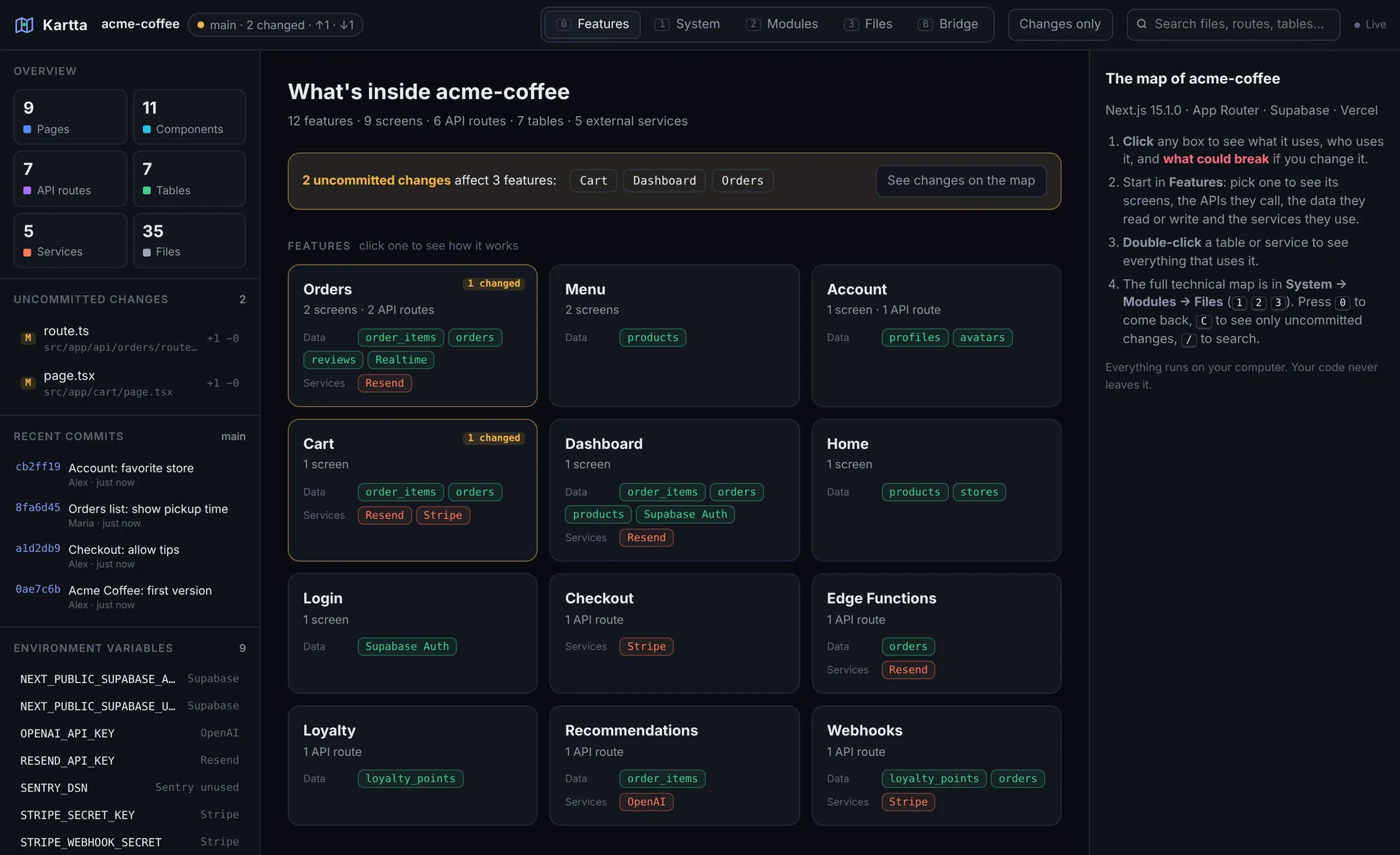
Kartta showing the features of a coffee ordering app: Orders, Menu, Cart, with the tables and services each one uses
The problem

AI wrote your app.
Do you know how it works?

Cursor, Claude and Lovable ship features in minutes. Understanding what they built — and what breaks when you change it — still takes hours.

“Where does this even happen?”

Fifty files later, you can’t tell which screen calls which API, or which table it writes to.

“What did the AI just change?”

A one-line prompt touched twelve files. Which features did it actually affect?

“I pulled and nothing works.”

A teammate added a table, a secret and a package. Nobody told you.

Features view

Your app, explained as features — not files

Kartta reads your project and groups it the way you think about it: Orders, Menu, Billing. Click one to see the whole flow.

  • 🖥️Screens → the APIs they call → the tables they read and write → the services they use
  • 🗄️Supabase tables, columns and relations, auth, storage and edge functions
  • 🔌Stripe, Resend, OpenAI, Google, Twilio and 30+ services detected automatically
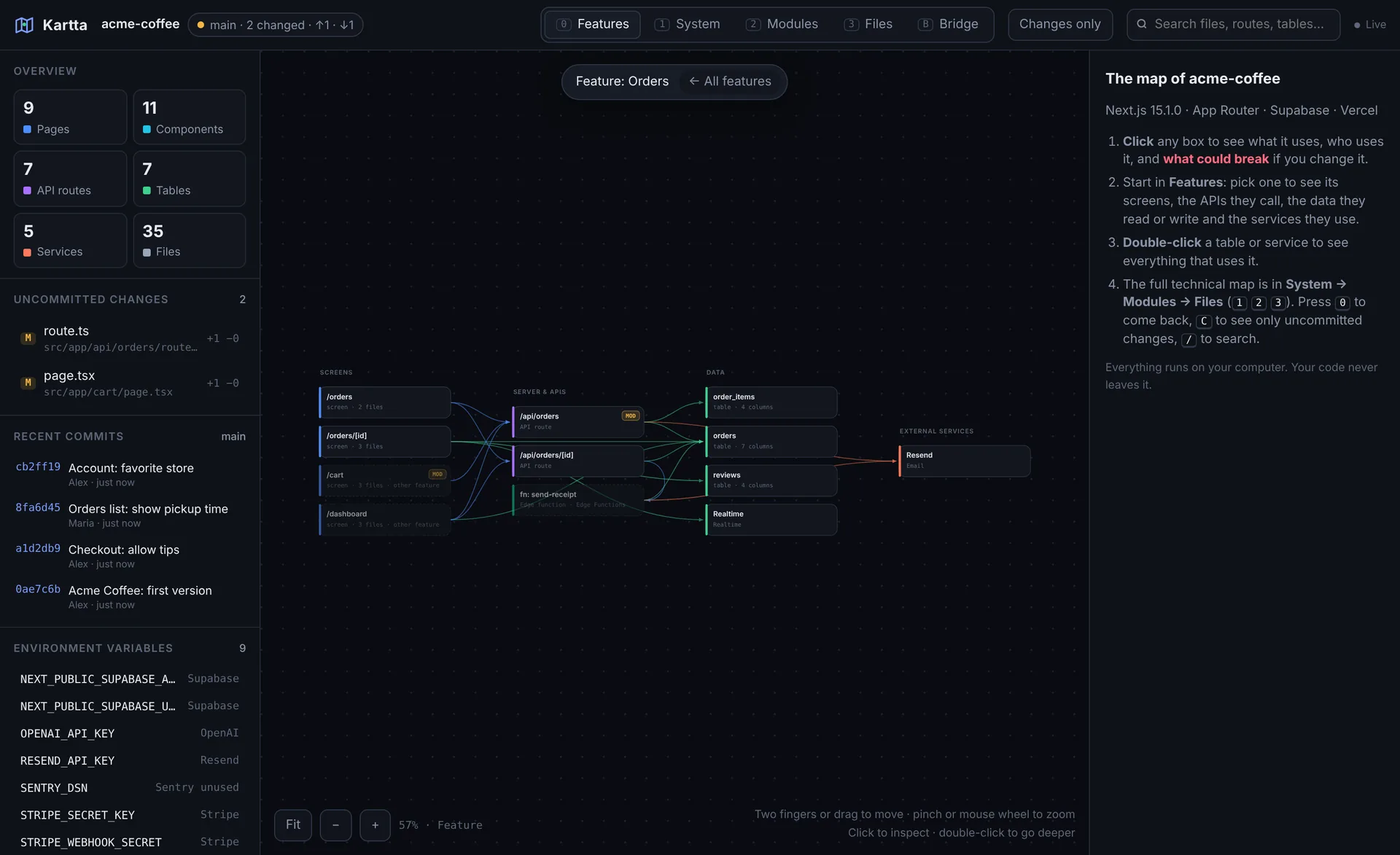
The Orders feature: screens, the API routes they call, and the tables they read and write
Impact

Know what breaks before you change it

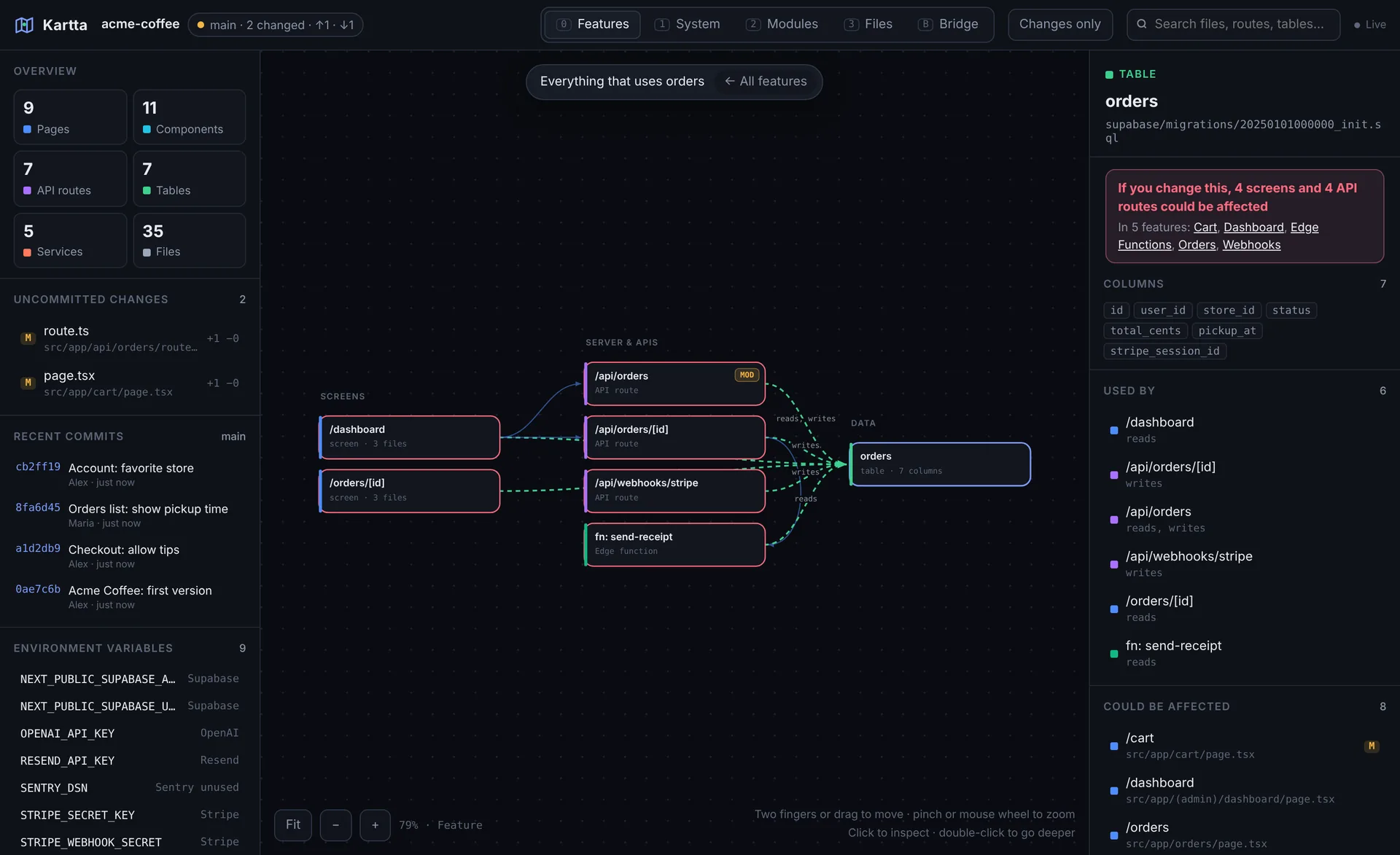
Click any table, API or file and Kartta shows every screen and feature that depends on it.

  • ⚠️“If you change this, 3 screens and 5 API routes could be affected”
  • ✅Or the good news: safe to change
  • 🧭Zoom out to the whole system, or down to a single file — like a map
Everything that uses the orders table, with the screens and features that could be affected
Bridge

Your computer ↔ GitHub, with nothing left to guess

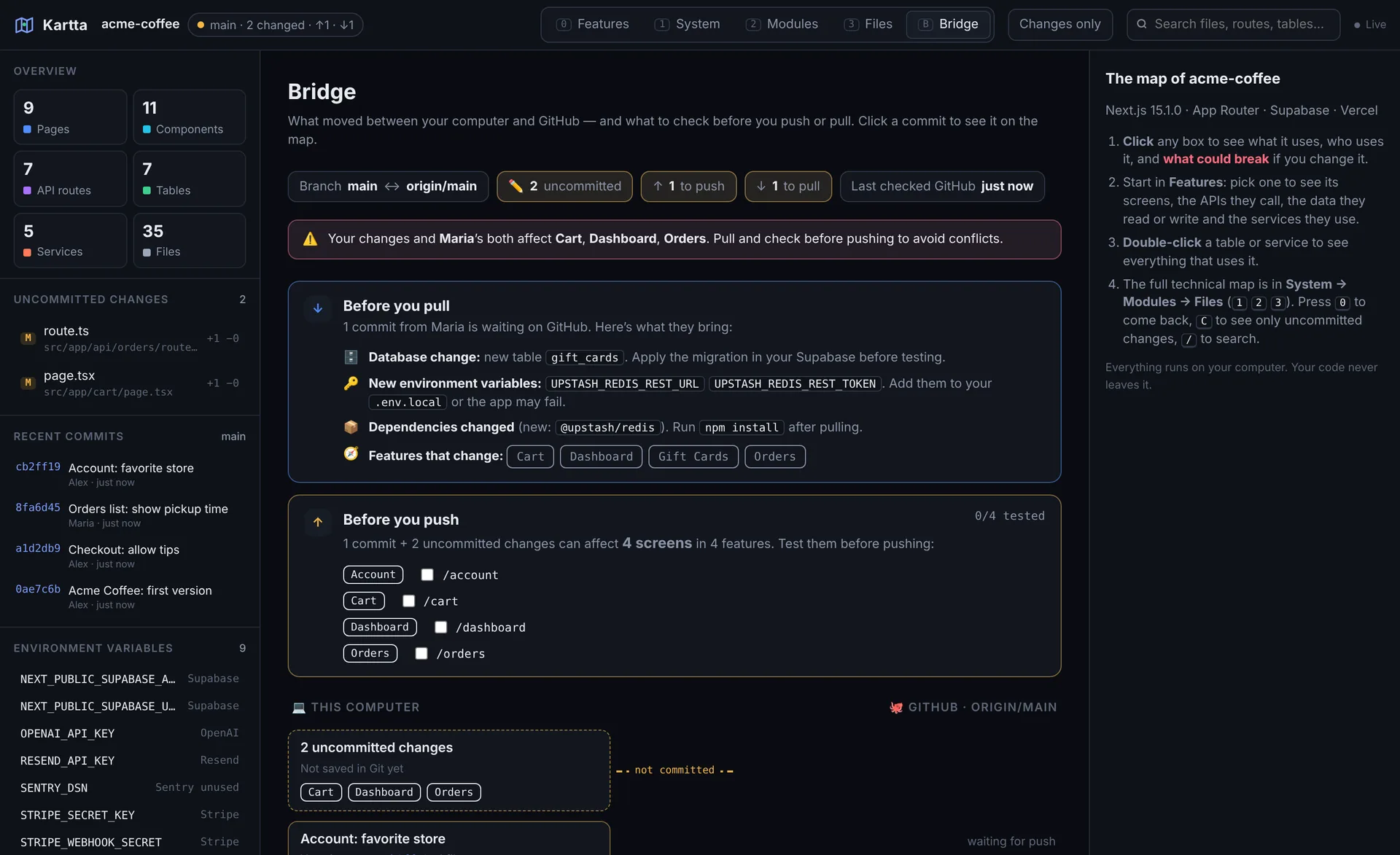
See every commit, push and pull — and which features each one touched. Then get told exactly what to do.

  • ↑Before you push: the screens to test, as a checklist
  • ↓Before you pull: new tables to migrate, missing env vars, npm install
  • ⚠️Conflict warnings: “your changes and Maria’s both affect Orders”
  • 💳Sensitive changes flagged: payments, auth, database, permissions
The Bridge: before you pull (new table, new env var, new dependency) and before you push (screens to test)
How it works

A map in ten seconds

01
Open your folder

Pick your project in the browser. Kartta reads it right there — nothing is uploaded.

02
Explore the map

Features, flows, impact. It refreshes as your AI edits code.

03
Add Git with one command

Run npx kartta to see uncommitted changes and the Bridge, live.

🔒
Local first

Your code is analyzed on your computer, never uploaded.

👀
Read-only

Kartta never edits code, pushes or pulls.

🔑
No secrets

It reads env variable names, never their values.

🤝
Paired, not open

The local helper only talks to Kartta, with a one-time code.

Pricing

Free on your computer. Pro when you ship daily.

Everything that runs locally is free forever. Pro and Team add GitHub, AI and your whole team.

Free

For trying it and side projects
$0 forever

  • Open any local project folder
  • Live Git view with npx kartta
  • Features view, flows and impact
  • Uncommitted changes, live
  • Bridge for your own commits
  • 1 saved project
  • Share maps (with “Made with Kartta”)
Start free
Founder price

Pro

For vibe coders shipping every day
$9 / month

$5/month forever for the first 100 · try 14 days for $1

  • Everything in Free, plus:
  • GitHub: private repos, every branch
  • Full Bridge: local ↔ GitHub
  • Pull request impact
  • AI explanations of each feature
  • Production lane (Vercel)
  • Unlimited projects, no branding
Reserve founder price

Team

For startups and agencies
$12 / person / month

Minimum 3 people · try 14 days for $1

  • Everything in Pro, plus:
  • Shared team workspace
  • Bridge with everyone’s changes
  • “You and Maria are both changing Bookings”
  • Automatic impact comment on every PR
  • Permissions
Join the team waitlist

Yearly: 2 months free. Pro and Team are coming soon — join the waitlist to lock in founder pricing.

Waitlist

Get Pro first — at founder price

The first 100 people pay $5/month forever. We’ll email you once, when it’s ready. No spam.

For teams

For anyone shipping fast with AI

Solo builders, startups and agencies — everyone who ships faster than they can read the code.

Teams & startups

Ship fast without breaking things.

  • New developers understand the product on day one
  • See the impact of every pull request before merging
  • Know when two people are changing the same feature
  • Hand clients a map of what you built
Join the team waitlist

Enterprise

A living map of your software estate.

  • Local-only or self-hosted analysis
  • SSO, audit logs and security reviews
  • Multiple repositories and languages
  • Ownership and impact across teams
Contact us
FAQ

Questions

Does my code get uploaded anywhere?

No. When you open a folder, Kartta analyzes it inside your browser. The local helper (npx kartta) runs on your computer and only shares names and structure with the Kartta page you paired it with. Your code never reaches our servers.

Which frameworks does it support?

Today Kartta is built for Next.js (App Router and Pages Router) with Supabase — the most common stack for vibe-coded apps. It also detects 30+ services like Stripe, Resend, OpenAI and Google. More frameworks are coming.

Do I need to know how to code?

No. Kartta is made for people who build with AI. It explains your app in features and screens, and tells you what to test before you push.

Can Kartta change my code or push to GitHub?

Never. Kartta is read-only: it doesn’t edit files, commit, push or pull. It only tells you what’s happening and what to check.

Does it work with Cursor, Claude Code or Lovable?

Yes — it works with any editor or AI tool, because it reads the project folder itself. The map updates as the AI edits your files.

Which browsers?

Chrome, Edge, Brave and Arc get live updates and the Git connection. Safari and Firefox can open a project as a snapshot.